 Satisfactory Production Planner
🇯🇵 日本語
Satisfactory Production Planner
🇯🇵 日本語
Free unofficial web tool
Plan a whole Satisfactory production line from one target rate
Type the item you want and how many per minute. A linear programming solver works out the entire line in one pass, from the ore nodes to the finished part: which recipes to run, how many machines of each, the power draw and the raw resources per minute. The result is shown as tables, a flow chart and a build list, and can be exported to Excel.
Open the planner Continue where you left off
Nothing to install and no account to create. It runs in your browser.
Three things other calculators do not do
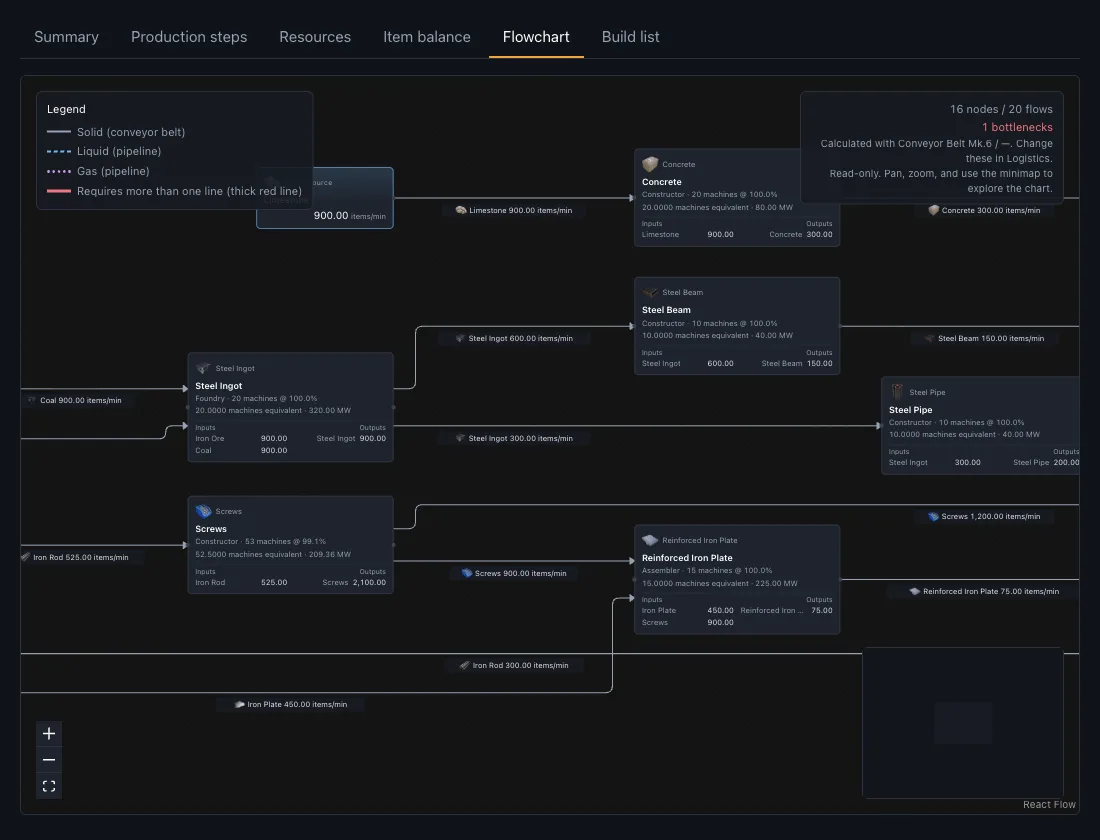
Nuclear waste is solved like any other step
Most calculators treat Uranium Waste and Plutonium Waste as items that cannot be made, so anything downstream of them, from Plutonium Pellet and Ficsonium to the whole reprocessing chain, comes back as impossible. This planner knows those items only come out of a running Nuclear Power Plant, so it puts the plant into the plan as a step and sizes it to the waste the line actually consumes. No power target is needed, and the MW the plant generates along the way is reported honestly in the summary.
When a plan really cannot be met, it still says why instead of stopping at "infeasible": a resource limit that is exceeded is shown with the limit, the amount required and the shortfall, and a missing recipe names the item it cannot make, each with the setting to review.
A build list in build order
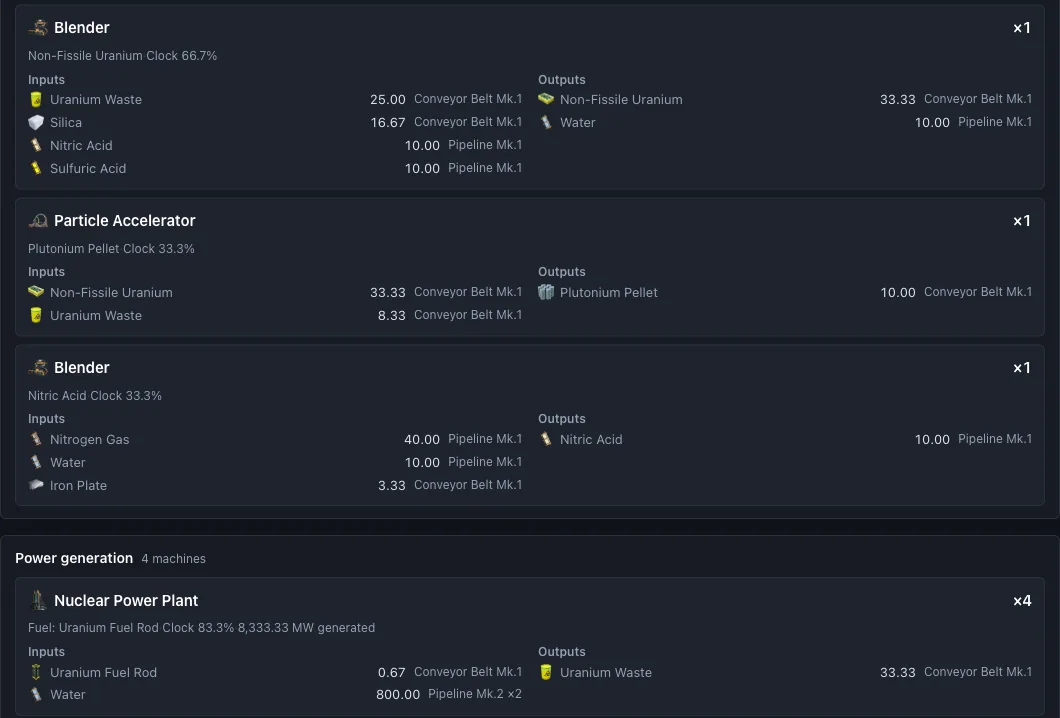
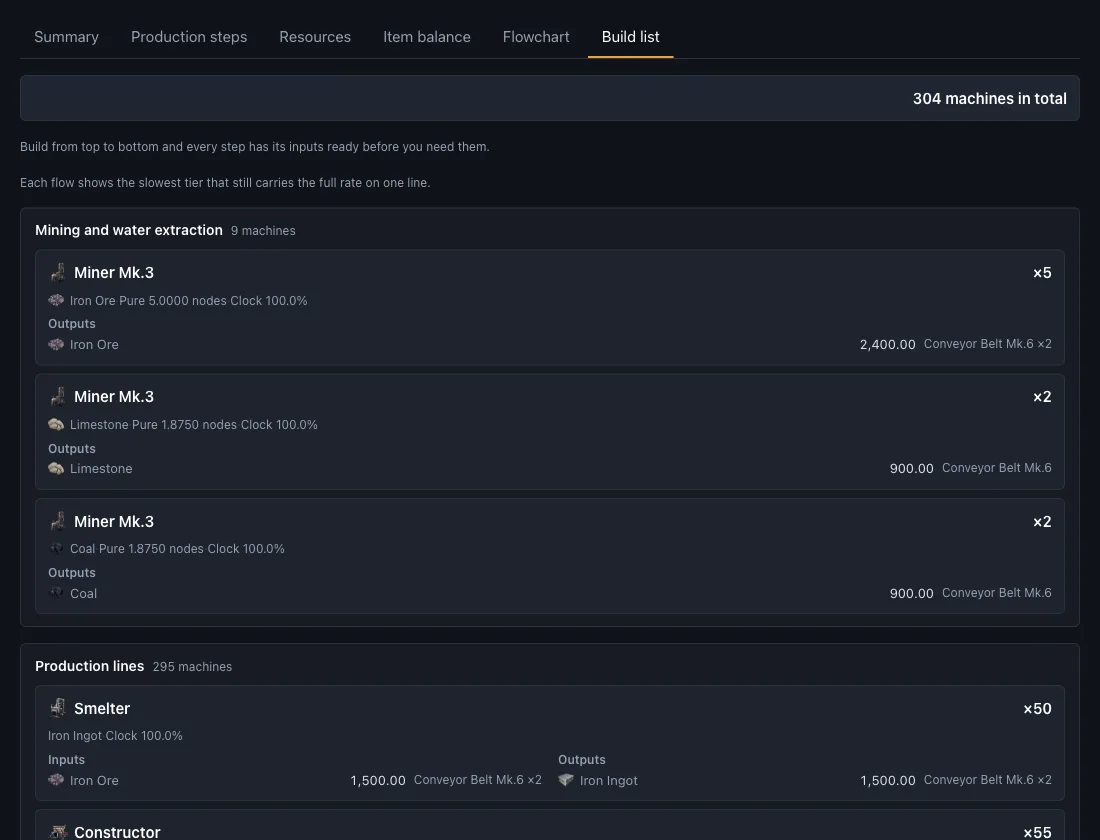
The solved plan is rearranged into a list that starts with mining and water extraction, then the production lines, then power generation. Build from the top and every step has its inputs ready before you need them. Each entry shows the building, how many to place, the clock speed, and the input and output rates per minute.
Every flow also names the lowest tier of Conveyor Belt or Pipeline that still carries the full rate on one line, so you do not have to work out on site which belt mark you need and how many of them.
The whole line solved at once, with power, floor area and building counts
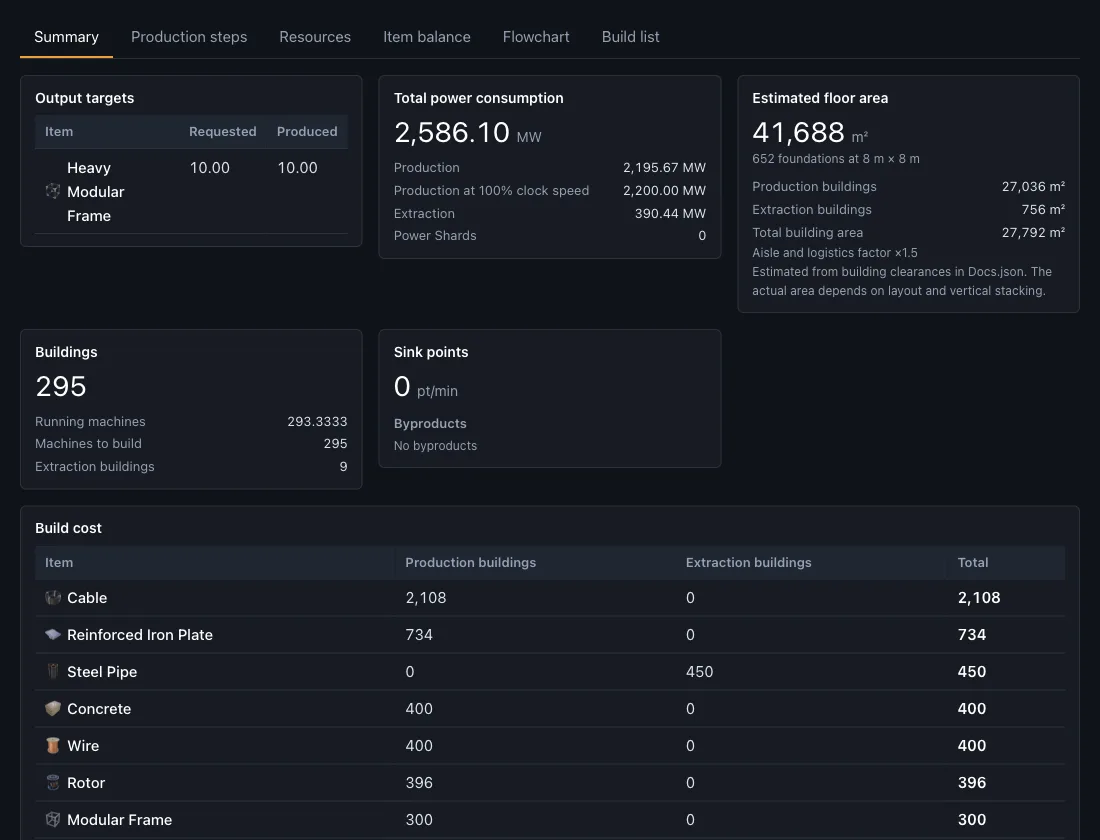
Instead of walking recipe by recipe, the solver optimises the entire line in a single pass. Choose whether to minimise raw resources, power or the number of buildings, and it returns the combination that is lowest by that measure. The summary lists total power draw, an estimated floor area in foundations, the building count, the build cost and sink points.
The result exports to Excel as six sheets: Summary, Building List, Item Balance, Resources, Build Cost and Logistics. A plan can also be packed into a share URL that reopens the same conditions on another device or for a friend.
How to use it in three steps
Enter a target
Search for the item you want and type the rate per minute. You can add several targets at once, and subtract what you already have in storage or from another factory as external inputs.
Choose the conditions
Switch on the alternate recipes you own, decide whether to plan power generation as well, and pick what to minimise: raw resources, power or buildings. The plan is recalculated every time you change something.
Read the result and share it
Check the Summary, Production steps, Resources and Item balance tables, the flow chart and the build list. Export to Excel, or copy the share URL to open the same plan on another device or send it to a friend.
Loop and power templates
Setups that feed a byproduct back upstream are the hardest to balance by hand. These templates open the planner with the conditions already filled in: complete oil recycling, water reuse for aluminium and batteries, and nuclear power with reprocessing.
Loop setups
- Complete Oil Recycling Loop 300 per minute each of Plastic and Rubber, with Fuel circulating between the two halves of a fully closed recycling loop. Open in the planner
- Aluminum Ingot Water Loop 120 Aluminum Ingot per minute, reusing the Water that the Aluminum Scrap step sends back upstream. Open in the planner
- Packaged Fuel Canister Loop 120 Fuel per minute: package the Water, then recover the Empty Canisters after dilution and use them again. Open in the planner
- Battery Water Loop 60 Battery per minute, returning the Water produced along the way to the Alumina Solution step. Open in the planner
Power setups
- Efficient Fuel Power 2,500 MW, following Crude Oil through Heavy Oil Residue and Diluted Fuel into Fuel-Powered Generators. Open in the planner
- Turbofuel Power 2,000 MW, using the power chain that turns Compacted Coal and Fuel into Turbofuel. Open in the planner
- Nuclear, stage 1: uranium power 5,000 MW from Uranium Fuel Rod alone: the smallest nuclear setup, and the one where the Uranium Waste has to be stored. Open in the planner
- Nuclear, stage 2: reprocess to plutonium 5,000 MW with every bit of Uranium Waste reprocessed into Plutonium Fuel Rod and burned, so that only Plutonium Waste remains. Open in the planner
- Nuclear, stage 3: closed loop with Ficsonium 5,000 MW with Plutonium Waste turned into Ficsonium Fuel Rod and burned as well, so that no nuclear waste is left at all. Open in the planner
- Simplified Uranium Power 2,500 MW of nuclear power built from alternate recipes, so the uranium chain never touches Sulfuric Acid and runs on belts alone. Open in the planner
Guides
From a first walkthrough of the planner to reading the alternate recipe metrics, counting coal generators and using the build list. Every number comes from the official game data.
- Your First Production Plan — A Guided Tour of the Planner
- Choosing Alternate Recipes — Reading Output per Machine, per MW and per Ingredient
- The Strongest Alternate Recipes and When to Use Them — Ore, Buildings and Power Compared with Real Numbers
- Getting Coal Power Running — Building Around a 600 MW Block of Eight
- Reading the Build List — What to Build and How Many
Frequently asked questions
Is the planner free, and do I need an account or an install?
It is free, there is no account to create and nothing to install. Open the page, name the item you want and the rate you want it at, and the plan appears. The game data ships with the page and the solving happens in your browser, so edits do not wait on a server.
Which game version is the data from, and where do the numbers come from?
Recipes, buildings and power figures are read from the game's own data files for version 1.1.x: 198 items, 291 recipes and 23 buildings. Nothing is retyped by hand, and item and recipe names use the official in-game translations, so the wording matches your screen.
Does it handle alternate recipes, Somersloops and overclocking?
All 109 alternate recipes can be switched on and off individually, and the solver only uses the ones you enable. Enter your Somersloop count and it adds fully amplified variants of the supported recipes, worth 2× the output for 4× the power. Production clock can be capped from 10% to 250%, extraction at 100% / 150% / 200% / 250%.
Can it plan power generation together with production?
Power is solved together with production. Allow the Coal-Powered Generator, Fuel-Powered Generator or Nuclear Power Plant, pick their fuels, then set a "Generation target" or tick "Cover factory power consumption". Fuel production is planned too, and byproducts such as Uranium Waste appear in the balance. Generator clock speed is fixed at 100%. Generator overclocking is not supported.
Can I get the result into a spreadsheet?
The Excel export writes an .xlsx with 6 sheets: Summary, Building List, Item Balance, Resources, Build Cost, Logistics. The file is built in your browser and downloaded straight away. On screen the same plan is also available as a flow chart and as a "Build list" that runs in build order, starting from extraction.
Where are my plans stored, and can I share them?
Plans are solved in your browser and saved there as well, in IndexedDB; the plan data is not sent to this site. Sharing packs the whole plan into the URL, so opening the link reproduces the same conditions on another device or for a friend. Clearing site data removes the saved plans.
What languages is the planner available in?
The interface is available in 12 languages. It follows your browser setting at first and can be switched inside the app. Item, recipe and building names come from the game's own translation for each language. The item reference and the written guides on this site are published in Japanese and English.